Part 1
Web Site vs. Web Application Project
Project structure
A web site has no project file. The "site" is simply the collection of files in the site's directory. Project/binary references and other configuration settings are stored in the web.config file (poor form in my opinion).
A web application project does have a project file, it's treated as a class library project. However, the visual studio template for a WAP provides some additional things such as what types of items are visible in the "Add new item" dialog (i.e. web form, master page, user control, web.config, etc) and configuration of debugging such as the settings for the development web server or IIS.
Codebehind/Codefile attribute
In a WAP, the markup directive (@Page, @Control, etc.) contains the "Codebehind" attribute. This is actually meaningless to the ASP.NET runtime, it's a linking attribute used by visual studio to indicate what the code-behind file is for the markup file.
In a site, the "Codefile" attribute is used. This is similar to the "Src" attribute. (I've experimented with the two and can't find a significant difference between them.) It tells the ASP.NET runtime what source code file should be compiled together with the markup. This is what links a markup file to a code behind file in the dynamic architecture of web sites.
Compilation
In both a site and WAP, the markup (AS?X files) are dynamically compiled. There is an exception but it's an advanced topic. All code files (including page code-behind) for a WAP are always pre-compiled. In a site, nothing is pre compiled. The ASP.NET runtime will compile everything in the App_Code directory into one DLL and each page will get compiled into its own DLL. This affects the class scope.
Class scope
Only code in App_Code is available to all classes in a site (that's where you HAVE to put shared code). In the WAP - because it's pre-compiled - all page classes live together in the same assembly and can thus see each other.
Namespaces
Perhaps the largest difference between the two is with the namespaces are constructed.
In a WAP all classes are created by default as members of the root namespace defined in the project (typically the project name). For example, in a project named "MyProject" the new page "MyPage" will have a fully qualified class name of "MyProject.MyPage". When you create sub directories in the project, visual studio creates another namespace level for pages created in those directories by default. So if I create a folder "Admin" and another page "MyPage" I will get a class name of "MyProject.Admin.MyPage".
In a site, all pages are part of the default root namespace for dynamically compiled pages: "ASP". Class names are created with underscore separation of their location when they live in sub directories. In a web site, instead of "MyProject.Admin.MyPage" the page class would actually be "Admin_MyPage". When it's dynamically compiled it will become "ASP.Admin_MyPage".
Which to chose
It is important to chose the right project type. With the changes introduced in Visual Studio 2005, it is now much easier to work with either type of project (no more IIS integration, woohoo!). Being able to open a web site via FTP is very helpful for certain needs. For some, the web site model will be ample. It's great for tests or simple sites that aren't code intensive.
However, I have found that in professional development the WAP is the better choice. Because there is a project file "controlling" the project it's easier to manage it with regards to what is actually included in the project which helps to control things such as the source control repository items for the project. In my case, having the project file is also necessary for the build system as the project file provides the parameters for what to build for a given project.
Yes, using a WAP forces us to always precompile the application. On the down side, this makes updates more difficult because any other changes are rolled in with it, we can't just update one single page. However, this is good in several ways.
Simply put, production code should not be updated willy-nilly. We need to exercise a fair amount of control over what gets pushed to production. The app should be regression tested by QA. Also, with a good build system and source control practices, you can do updates as necessary to deploy patches without including changes being made in a given applications main trunk. If you do need to make a change, there are ways to "patch" a single page by reverting it to the web site code file model.
Another benefit of using the WAP is that the project configuration is kept in the project file instead of in the web.config, where it really doesn't belong. This keeps the concerns (configuration of the actual app versus configuration of the project within Visual Studio) well separated.
Yet another good aspect to the WAP is that you can "see" all the classes in the project - they are all within the scope of the entire assembly. In some large projects with many developers and many pages that require query string arguments to function I've used a technique for doing "strongly typed page urls". Follow the link for more details, but in short: I create static page methods that return a properly formed URL. Using a managed method provides the opportunity to force required page parameters by using regular method arguments.
This is all obviously very biased towards using the WAP. This is partially due to where ASP.NET development started, in 1.1, with the web project. In the interest of full disclosure, I haven't worked with the web site model enough to really speak fairly for it. However, between the little I've worked with it and from what I've heard from speaking with other developers, for anything that isn't a trivial web site, the WAP is the way to go. The web site type is good in some cases, but as with any tool, it should be used where appropriate. Fortunately, Visual Studio has pretty good support for converting a web site to a web application project, so starting upgrading from a site is not terribly difficult.
Part 2
Introduction
This post explains about two project types in Visual studio ie Website and Web Application that we use to build the ASP.NET Applications and the fundamental differences between the two project types..
Background
Website project type was introduced in the VS 2005 and Web Application model introduced in VS 2003. Website project type is based on folder structure and does not require a project file. Later in VS 2005 sp1 project file was introduced for the VS 2005 website project type. Now in VS 2008 we can create both project types.
1. You can add Website or Webapplication project to your VS solution in VS 2008 as follows
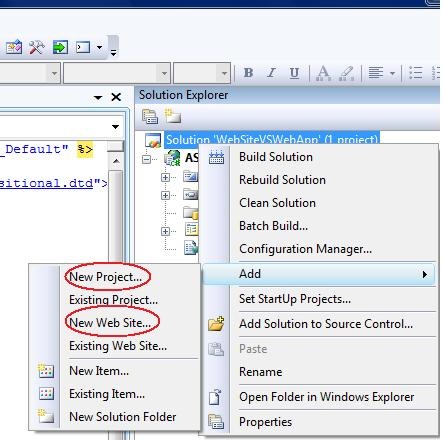
2. I have added two project types to the solution and it looks like the following

- Fundamentally the behavior of the application types is same but website project type is folder based and WebApp is project type like normal project types in VS studio. In WebApplication project type project file defines the structure of the project.
- WebSite project type contains the folders and anything that you put in the folder are dynamically compiled and be part in the website. More about ASP.NET Website Dynamic compilation here.
- WebApplication project type contains the designer for the ASPX page and you can find the bin folder which contains the compiled assembly.
So First difference can be summarized like ASP.NET website project type is dynamic and WebApp is more like structured.
3. When you add a class file to the website project it will prompt you that it will place the file in App_code folder under root.
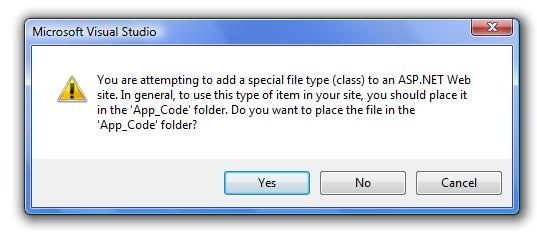
Notice In website project type namespace won’t add to the class by default however you can define the namespaces explicitly where as in WebApp it creates the namespace for the class file when you added it to the project.
4. WebApp project type is restricted to one language where as Website you can add different language files to the App_Code folder which compiles the files dynamically.
5. Referring a user control in WebApp is straight forward.You can define the properties and can be accessed in class files like any other objects where as in website it is not.
6.We can put multiple language files in the Website but those files needs to be in same folder. If you change the location of the file then you need to mention in the Web.Config file as follows..
In compilation process you will have the finer degree of control in WebApp and it is not in Website because everything is dynamically compiled.
7.When you deploy the WebApps you can just copy the Compiled Assembly and Visual elements to the IIS folder where as in Website you need to copy everything to the IIS to work.
8.You can see the following dialogue box when you publish the files in Website
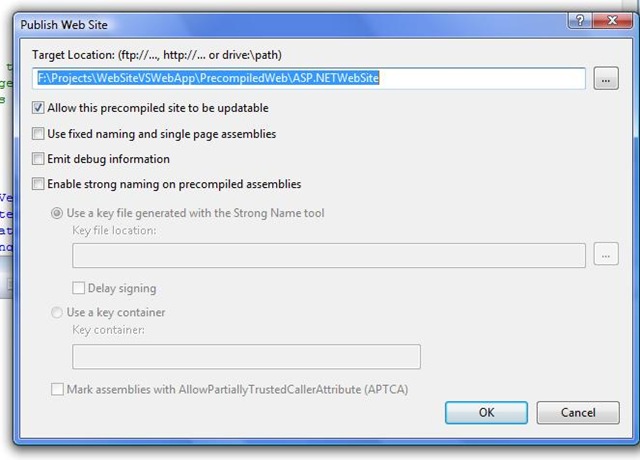
If you select the precompiled option then you will find the precompiled folder in the published location there you find the multiple assemblies for each folder in the website.
9. If you use WebApplication project you can not access Profie at design time a workaround solution can be found here.
10. The following link helps you to choose which project type you have to user for the developing web applications.

No comments:
Post a Comment